Export
Once training and adapter merging are complete, your merged_model/ directory (config.json, model.safetensors, tokenizer.json) can be served directly on GPU clusters or used on desktop, Apple Silicon, and mobile devices.
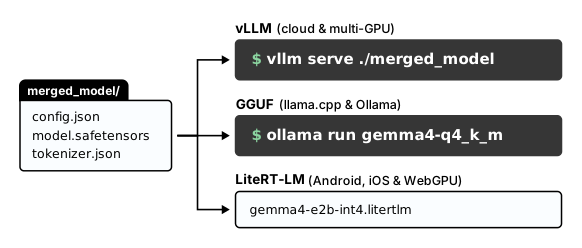
1. vLLM
vLLM serves Hugging Face SafeTensors directories directly, or can dynamically attach unmerged LoRA adapters at request time:
If you merged your LoRA adapter into the base weights with merge_and_unload() or ran full fine-tuning, point vllm serve at your merged_model/ folder:
If you kept your LoRA adapter separate, load the official frozen Gemma 4 base checkpoint once and attach multiple adapters with --enable-lora:
# Serve one shared base checkpoint with multiple per-request LoRA adapters
vllm serve google/gemma-4-E4B-it \
    --enable-lora \
    --max-lora-rank 32 \
    --lora-modules sql-adapter=./gemma-4-text-to-sql medical-adapter=./gemma-4-medical-lora
Pass "model": "sql-adapter" or "model": "medical-adapter" in your OpenAI-compatible API request to pick the adapter per request.
2. GGUF
To run your fine-tuned Gemma 4 model locally with llama.cpp or Ollama, you can convert it to a .gguf file in 16-bit and quantize it to 4-bit with:
# Convert Hugging Face SafeTensors directory to FP16 GGUF
python llama.cpp/convert_hf_to_gguf.py ./merged_model \
    --outfile model-f16.gguf \
    --outtype f16

# Quantize FP16 GGUF to 4-bit Q4_K_M
./llama.cpp/build/bin/llama-quantize \
    model-f16.gguf \
    model-q4_k_m.gguf \
    Q4_K_M
3. LiteRT-LM
To run your small models (Gemma 4 E2B and E4B) on mobile devices with LiteRT-LM, export your checkpoint to a .litertlm bundle. Passing --externalize_embedder separates Gemma 4's Per-Layer Embeddings table so the active transformer weights can run in 4-bit precision on the mobile GPU or NPU without exhausting device memory.
Install litert-torch-nightly and litert-lm, export ./merged_model, and test the bundle locally:
# Install LiteRT conversion and CLI tools
uv tool install litert-torch-nightly litert-lm

# Export the merged checkpoint with externalized Per-Layer Embeddings
litert-torch export_hf \
    --model=./merged_model \
    --output_dir=./litert_out \
    --externalize_embedder \
    --jinja_chat_template_override=litert-community/gemma-4-E2B-it-litert-lm

# Run a quick local smoke test on the exported bundle
litert-lm run ./litert_out/model.litertlm --prompt="What is the capital of France?"
For Android, iOS, C++, and Python integration steps, see the LiteRT-LM deployment guide.
What's next
Deploy fine-tuned Gemma 4 checkpoints with vLLM, Ollama, llama.cpp, Google Cloud, or LiteRT-LM.
Shard training across multi-GPU nodes with FSDP2 and recover 4-bit accuracy with TorchAO QAT.
Speed up single-GPU LoRA and export directly to GGUF with a single helper call.
Let an AI coding agent set up, validate, and run local Gemma 4 fine-tuning workflows for you.