Speed-up Gemma 4 with Multi-Token Prediction

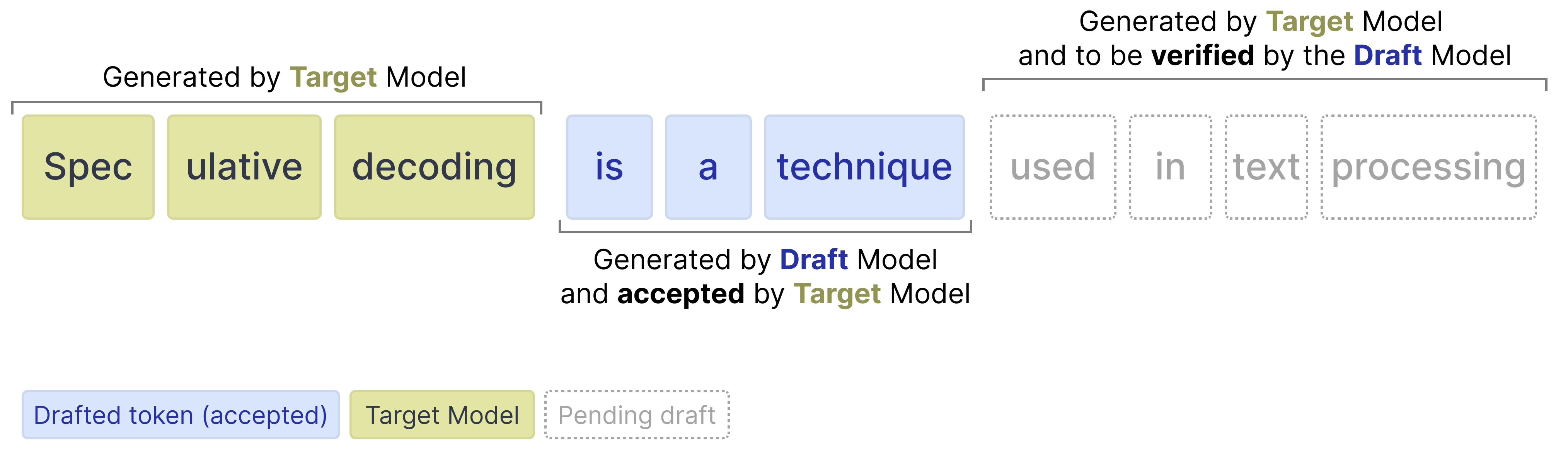
In Gemma 4, Multi-Token Prediction (MTP) is the specific architecture used to enable highly efficient Speculative Decoding. Speculative decoding is a technique to speed up inference in large language models. Instead of relying solely on the large target model to generate tokens autoregressively (generating one token at a time, where each new token depends on the previous ones), a smaller, faster 'draft model' predicts several tokens ahead. The target model then verifies these drafted tokens in parallel. If the target model rejects a drafted token, it still produces the correct token for that position (ensuring that step is not wasted), and the draft model resumes predicting from that new correct token.
Gemma 4 implements MTP by extending the base model with this smaller, faster draft model. This draft model is not independent as it shares the input embedding table with the target model and builds directly upon its last-layer activations. This results in significant decoding speedups while guaranteeing the exact same quality as standard autoregressive generation, making these checkpoints perfect for low-latency and on-device applications.
Speculative decoding works by drafting several tokens and verifying them in a single forward pass. For dense models, the same weights are used for every token, so verifying multiple drafted tokens adds minimal overhead. Mixture of Experts (MoE) models like Gemma 4 26B A4B work differently. Each token may activate different experts, so verifying drafted tokens can require loading additional expert weights from memory, offsetting the gains from drafting. At higher batch sizes, there is typically more overlap in activated experts across sequences, improving reuse of loaded weights. At batch size 1 this overlap is limited, which is why the 26B A4B drafter may not yield speedups on hardware platforms without good parallelism.
Tip
For an illustrated walkthrough, see A Visual Guide to Multi-Token Prediction.
MTP Enhancements
Gemma 4 introduces several enhancements to the standard speculative decoding pipeline to improve the quality of drafted tokens and efficiency:
- Shared Input Embeddings: The draft model shares the input embedding table with the target model.
- Target Activations: The draft model uses the activations from the last layer of the target model, concatenates them with the token embeddings, and down-projects them to the drafter model's dimension.
- Efficient Embedder: To avoid the expensive operation of predicting across the entire vocabulary, the model groups similar tokens into clusters. It first identifies the most likely clusters and then restricts its final calculations to only the tokens within those selected clusters (E2B and E4B only).
Run MTP with Transformers
After the drafter has predicted multiple draft tokens, the target model now only has to verify those suggested draft tokens. The verification is done in parallel thereby drastically speeding up inference. It reduces the number of forward passes the target model has to do for each token. Because our drafter generates a sequence of tokens for verification, we refer to it as the Multi-Token Prediction (MTP) head.
Install Python packages
Install the Hugging Face libraries required for running the Gemma 4 and Gemma 4 assistant model.
# Install PyTorch & other libraries
pip install torch accelerate

# Install the transformers library
pip install transformers
Load the models
For each target model (one of the main models in the Gemma 4 model), there is an assistant to helps speed up inference. As such, you will load two models:
- Target (e.g.,
google/gemma-4-E2B-it): The full Gemma 4 target model - Drafter (e.g.,
google/gemma-4-E2B-it-assistant): The lightweight 4-layer MTP drafter that proposes candidate tokens
Note that the drafter is often referred to as the assistant since the model helps the larger model in choosing which tokens to predict.
Use the transformers libraries to create an instance of a processor and model using the
AutoProcessor and AutoModelForCausalLM classes as shown in the following code example:
TARGET_MODEL_ID = "google/gemma-4-E2B-it"
ASSISTANT_MODEL_ID = TARGET_MODEL_ID + "-assistant"

import torch
from transformers import AutoProcessor, AutoModelForCausalLM

# Target Model
processor = AutoProcessor.from_pretrained(TARGET_MODEL_ID)
target_model = AutoModelForCausalLM.from_pretrained(
    TARGET_MODEL_ID,
    torch_dtype=torch.bfloat16,
    device_map="auto",
)

# Assistant Model (the drafter)
assistant_model = AutoModelForCausalLM.from_pretrained(
    ASSISTANT_MODEL_ID,
    torch_dtype=torch.bfloat16,
    device_map="auto",
)
Gemma 4 with the assistant
Using an assistant in transformers is fortunately quite straightforward and requires you to
pass the assistant model to the model.generate function:
# Process inputs with the `target_model`
messages = [
    {
        "role": "user",
        "content": "Explain the concepts of speculative decoding and MTP in 3 sentences."
    }
]
input_text = processor.apply_chat_template(messages, tokenize=False, add_generation_prompt=True)
inputs = processor(text=input_text, return_tensors="pt").to(target_model.device)

# `assistant_model=assistant_model` is all you need to enable MTP!
outputs = target_model.generate(
    **inputs,
    assistant_model=assistant_model,
    max_new_tokens=256,
    do_sample=False,
)

# Decode the response into text
response = processor.decode(outputs[0][inputs["input_ids"].shape[1]:], skip_special_tokens=True)
print(response)
Under the hood, the process is as follows:
- The drafter proposes N tokens generated autoregressively
- The target model verifies all N tokens in one forward pass
- Drafted tokens with high probabilities are accepted
- Drafted tokens with low probabilities are rejected
- Since the target model does a forward pass, it will always generated 1 token by itself regardless of how many drafted tokens were accepted or rejected
Draft tokens
The drafter can generate any amount of tokens for the target model to verify. However, the target model can still choose to reject certain tokens. When it does, all tokens after that are ignored.

As such, it is important to know the tradeoff when using various values for the number of drafted tokens.
More draft tokens
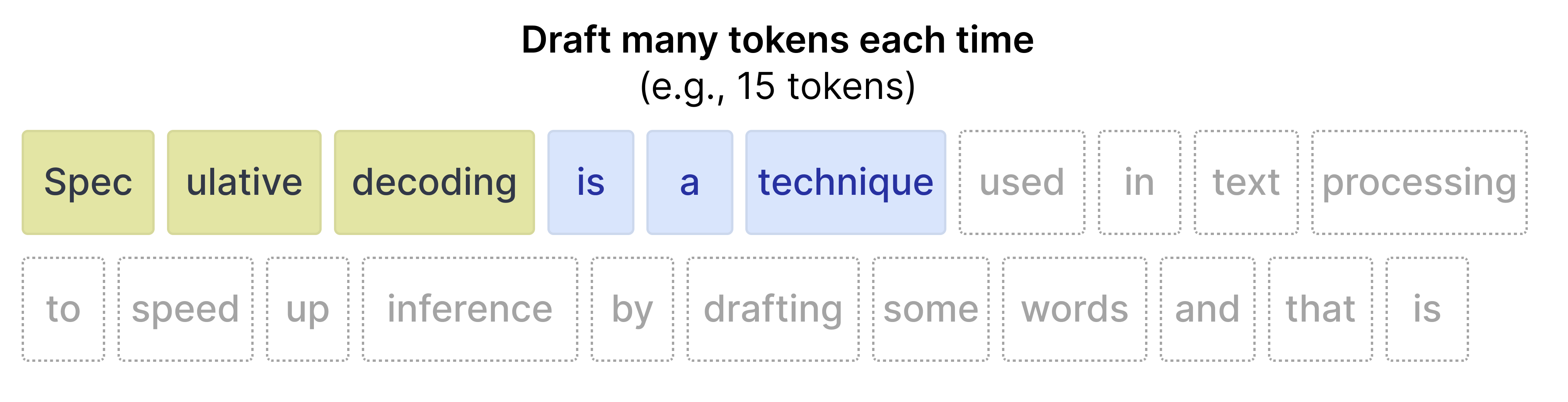
When you draft many tokens (for instance 15), then there is a high chance that not all tokens will be accepted. As such, there is a higher potential for wasted compute. In contrast, it does have a tendency to speed up inference when the acceptance rate is high.
Fewer draft tokens
When you draft fewer tokens, the acceptance rate tends to be higher since tokens that are closer in position to the initial prompt are more accurate. However, since only a few tokens are drafted, the speed up that you would get from a faster drafter model is reduced.

Fortunately, you do not have to experiment with the best values for your use case in
transformers since you can set the num_assistant_tokens_schedule to "heuristic" which will
automatically adapt the number of drafted tokens at runtime:
- All tokens accepted -- Increase the number of tokens to draft by 2 since the drafter is quite accurate for the prompt. Increasing the number of tokens drafted might result in a speed up if those tokens are also accepted.
- Any tokens rejected -- If any tokens are rejected, reduce the amount of tokens to draft by 1. Reducing the number of tokens makes it so that not too many drafted are wasted if the target model continues to reject most of the tokens.
Likewise, you can update number of draft tokens by updating num_assistant_tokens in the
drafter like so:
# Update how many draft tokens are generated at the start of inference
assistant_model.generation_config.num_assistant_tokens = 4

# Update how the number of draft tokens are updated ("heuristic" for a dynamic schedule and "constant" for a constant schedule)
assistant_model.generation_config.num_assistant_tokens_schedule = "heuristic"

# Run with MTP
outputs = target_model.generate(
    **inputs,
    assistant_model=assistant_model,
    max_new_tokens=256,
    do_sample=False,
)

# Decode the response into text
response = processor.decode(outputs[0][inputs["input_ids"].shape[1]:], skip_special_tokens=True)
print(response)