# Fine-Tune Multimodal EmbeddingGemma 2 with Sentence Transformers
**EmbeddingGemma 2** maps text, images, audio, and video into a unified 768-dimensional vector space. So you can fine-tune it on **cross-modal triplets**, such as `(text_query, positive_image, negative_image)`, using the same Sentence Transformers training pipeline used for text.
!!! note "Note"
This guide requires a GPU which support bfloat16 data type such as NVIDIA L4 or NVIDIA A100.
## Example Scenario: Korean Ink Wash Painting Archive Search
Imagine you are building a digital archive search engine for a museum exhibition of traditional Joseon-dynasty Korean paintings:
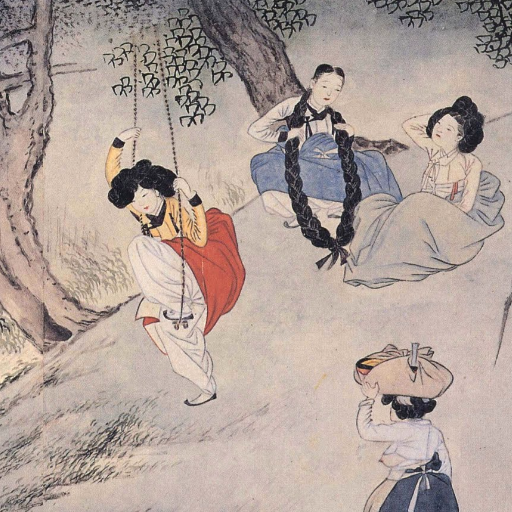
* **[Shin Yunbok](https://artsandculture.google.com/entity/sin-yun-bok/m0749t2), *Dano Pungjeong* (Scenery on Dano Day)** (`ink-wash-1.png`): Genre painting (*pungsokhwa*) of women bathing by a stream and riding a swing during the Dano festival
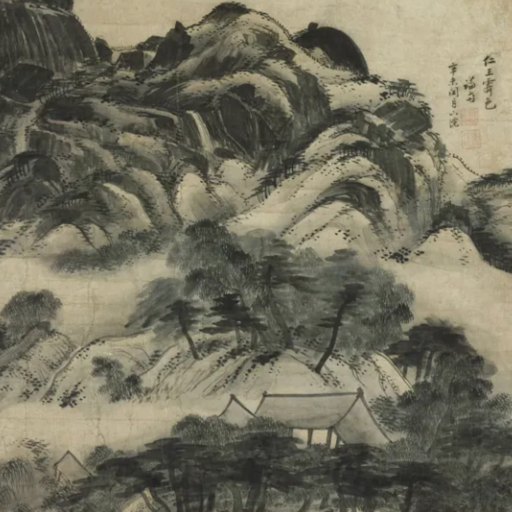
* **[Jeong Seon](https://artsandculture.google.com/entity/jeong-seon/m06w7x2), *Inwangjesaekdo* (Clearing after Rain on Mount Inwang)** (`ink-wash-2.png`): True-view landscape painting (*jingyeong sansuhwa*) of rain-soaked granite peaks emerging from mist
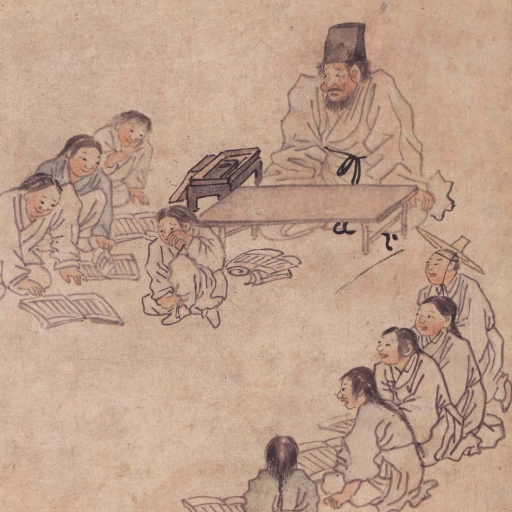
* **[Kim Hongdo](https://artsandculture.google.com/entity/gim-hongdo/m0749cz), *Seodang* (Village School)** (`ink-wash-3.png`): Genre painting of a village schoolmaster, a weeping student, and giggling classmates
Out of the box, **EmbeddingGemma 2** can retrieve the right painting when given a **descriptive scene caption** (such as *"Scenery on Dano Day"* or *"Village School"*). However, when a user searches by **artist name** alone (e.g. *"Show me an ink wash painting of Shin Yunbok."*), a model sees three visually similar traditional Korean ink wash works and may misrank them without domain-specific artist attribution.
**What this guide covers:**
* Installing dependencies and loading **EmbeddingGemma 2** (`google/embeddinggemma-2`) with text and vision encoders
* Evaluating baseline **text-to-image** retrieval performance (comparing artist-based queries vs. descriptive scene queries) before fine-tuning
* Preparing cross-modal `(anchor, positive, negative)` training triplets linking artist names to their paintings
* Fine-tuning the model using `SentenceTransformerTrainer`, `MultipleNegativesRankingLoss`, and column-specific task prompts
* Evaluating post-training improvements and saving your adapted multimodal model
!!! tip "New to multimodal inference with EmbeddingGemma 2?"
See [Multimodal Embeddings with EmbeddingGemma 2](multimodal.md) for an overview of image, audio, video, and interleaved inputs.
## Setup and Installation
Install `sentence-transformers`, `transformers`, `datasets`, and `pillow` for image processing.
Sentence Transformers is a Python framework for using and training embedding and reranker models. For more details on the framework, see the [Sentence Transformers documentation](https://www.sbert.net/).
```bash { .notebook-cell }
pip install -U sentence-transformers transformers datasets pillow soundfile torchcodec
```
## (Optional) Hugging Face Authentication
You need a valid Hugging Face Token to publish your model. If you are running inside Google Colab, you can securely load your Hugging Face Token from Colab secrets; otherwise you can pass the token directly to `login()`. Make sure your token has write access if you plan to push your fine-tuned model to the Hub.
```python { .notebook-cell }
from huggingface_hub import login
login()
```
## Load the Base Model
Load `google/embeddinggemma-2` using `SentenceTransformer`.
```python { .notebook-cell }
from sentence_transformers import SentenceTransformer
model_id = "google/embeddinggemma-2"
model = SentenceTransformer(
model_id,
config_kwargs={"audio_config": None},
)
print(f"Device: {model.device}")
print(f"dtype: {model.dtype}")
print(model)
print("Total number of parameters in the model:", sum(p.numel() for p in model.parameters()))
```
``` { .no-copy .output }
Loading weights: 0%| | 0/624 [00:00 *"Show me an ink wash painting of Shin Yunbok."*
Our three candidate paintings are:
1. **Shin Yunbok, *Dano Pungjeong* (Scenery on Dano Day)** (`ink-wash-1.png`) — **Target Match**
2. **Jeong Seon, *Inwangjesaekdo* (Clearing after Rain on Mount Inwang)** (`ink-wash-2.png`) — **Hard Negative**
3. **Kim Hongdo, *Seodang* (Village School)** (`ink-wash-3.png`) — **Hard Negative**
```python { .notebook-cell }
from PIL import Image
from IPython.display import display
import requests
IMAGE_SIZE = 240
def load_image(url):
return Image.open(requests.get(url, stream=True).raw).convert("RGB").resize((IMAGE_SIZE, IMAGE_SIZE))
# Load Korean ink wash paintings
ink_wash_1 = load_image("https://github.com/bebechien/gemma/raw/refs/heads/main/images/ink-wash-1.png")
ink_wash_2 = load_image("https://github.com/bebechien/gemma/raw/refs/heads/main/images/ink-wash-2.png")
ink_wash_3 = load_image("https://github.com/bebechien/gemma/raw/refs/heads/main/images/ink-wash-3.png")
task_name = "Retrieval-query"
query = "Show me an ink wash painting of Shin Yunbok."
candidates = [
{"label": "Shin Yunbok, Dano Pungjeong (Scenery on Dano Day)", "image": ink_wash_1},
{"label": "Jeong Seon, Inwangjesaekdo (Clearing after Rain on Mount Inwang)", "image": ink_wash_2},
{"label": "Kim Hongdo, Seodang (Village School)", "image": ink_wash_3},
]
for item in candidates:
print(item["label"])
display(item["image"])
def evaluate_retrieval(query_text, candidate_items):
print(f"Query: {query_text}")
query_emb = model.encode(query_text, prompt_name=task_name)
image_embs = model.encode([item["image"] for item in candidate_items])
similarities = model.similarity(query_emb, image_embs)[0]
for item, score in zip(candidate_items, similarities):
print(f"Painting: {item['label']:<66} -> 🤖 Score: {score.item():.4f}")
print("-"*80)
print("Baseline Scores (Before Fine-Tuning):")
evaluate_retrieval(query, candidates)
```
``` { .no-copy .output }
Shin Yunbok, Dano Pungjeong (Scenery on Dano Day)
```
``` { .no-copy .output }
Jeong Seon, Inwangjesaekdo (Clearing after Rain on Mount Inwang)
```
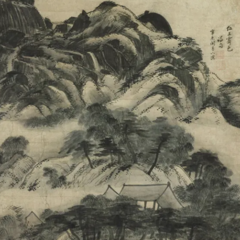
``` { .no-copy .output }
Kim Hongdo, Seodang (Village School)
```
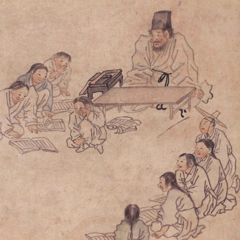
``` { .no-copy .output }
--------------------------------------------------------------------------------
Baseline Scores (Before Fine-Tuning):
Query: Show me an ink wash painting of Shin Yunbok.
Painting: Shin Yunbok, Dano Pungjeong (Scenery on Dano Day) -> 🤖 Score: 0.6753
Painting: Jeong Seon, Inwangjesaekdo (Clearing after Rain on Mount Inwang) -> 🤖 Score: 0.7005
Painting: Kim Hongdo, Seodang (Village School) -> 🤖 Score: 0.6631
```
!!! note "Note on Task Prompts for Cross-Modal Search"
Task-specific prompt prefixes apply to **text inputs only**. Here we encode the text query with `prompt_name="Retrieval-query"` (`"task: search result | query: "`) and encode the candidate images directly without a text prefix. For details on all available prompts, see the [EmbeddingGemma 2 model card](model-card-v2.md#best-practices).
### Why Did the Baseline Query Misrank the Paintings?
In the baseline evaluation above, searching for *"Show me an ink wash painting of Shin Yunbok."* **misranks** the candidates: the base model assigns the highest similarity score to **Jeong Seon's _Inwangjesaekdo_** instead of the true match, **Shin Yunbok's _Dano Pungjeong_**.
Note that the base model **does** retrieve the correct image out of the box when you provide a **descriptive caption** about the visual scene itself (such as *"Dano Pungjeong (Scenery on Dano Day)"* or *"Seodang (Village School)"* below). However, because an artist's name (*"Shin Yunbok"*) is domain metadata rather than a literal visual description of the scene, fine-tuning is needed to teach the model to associate each artist with their painting.
```python { .notebook-cell }
query_desc = "Dano Pungjeong (Scenery on Dano Day)"
evaluate_retrieval(query_desc, candidates)
print("-"*80)
query_desc = "Seodang (Village School)"
evaluate_retrieval(query_desc, candidates)
```
``` { .no-copy .output }
Query: Dano Pungjeong (Scenery on Dano Day)
Painting: Shin Yunbok, Dano Pungjeong (Scenery on Dano Day) -> 🤖 Score: 0.6892
Painting: Jeong Seon, Inwangjesaekdo (Clearing after Rain on Mount Inwang) -> 🤖 Score: 0.6767
Painting: Kim Hongdo, Seodang (Village School) -> 🤖 Score: 0.6478
--------------------------------------------------------------------------------
Query: Seodang (Village School)
Painting: Shin Yunbok, Dano Pungjeong (Scenery on Dano Day) -> 🤖 Score: 0.6777
Painting: Jeong Seon, Inwangjesaekdo (Clearing after Rain on Mount Inwang) -> 🤖 Score: 0.6782
Painting: Kim Hongdo, Seodang (Village School) -> 🤖 Score: 0.6997
```
## Prepare the Multimodal Fine-Tuning Dataset
To teach the model to associate each Joseon-dynasty master with their artwork, we structure our training data as cross-modal contrastive triplets: **`(anchor, positive, negative)`**:
* **`anchor` (Text)**: The artist's name (`"Shin Yunbok"`, `"Jeong Seon"`, `"Kim Hongdo"`).
* **`positive` (Image)**: The matching `PIL.Image` painting by that artist.
* **`negative` (Image)**: Another traditional Korean ink wash painting by a different artist, acting as a visual hard negative.
`SentenceTransformerTrainer` automatically inspects each column's modality and preprocesses text and images transparently—no manual tokenization or pixel preprocessing is required.
```python { .notebook-cell }
from datasets import Dataset
triplets = [
[
"Shin Yunbok",
ink_wash_1,
ink_wash_2,
],
[
"Jeong Seon",
ink_wash_2,
ink_wash_3,
],
[
"Kim Hongdo",
ink_wash_3,
ink_wash_1,
],
]
# Convert into a Hugging Face Dataset with text 'anchor' and image 'positive'/'negative' columns
data_as_dicts = [
{"anchor": row[0], "positive": row[1], "negative": row[2]}
for row in triplets
]
train_dataset = Dataset.from_list(data_as_dicts)
print(train_dataset)
```
``` { .no-copy .output }
Dataset({
features: ['anchor', 'positive', 'negative'],
num_rows: 3
})
```
!!! tip "Tip (Other Multimodal Formats)"
Dataset columns can also contain image file paths/URLs, audio waveforms, video paths, or multimodal dictionaries like `{"text": "caption", "image": pil_image}` when training on interleaved inputs.
!!! note
For demonstration purposes, we create a compact dataset of 3 cross-modal triplets below. In production applications, use hundreds or thousands of domain-specific pairs or triplets for robust generalization.
## Fine-Tuning the Multimodal Model
We fine-tune the model using `SentenceTransformerTrainer` and **`MultipleNegativesRankingLoss`**, which pulls `(anchor, positive)` text-image pairs closer together in the shared 768-dimensional embedding space while pushing `(anchor, negative)` pairs—and in-batch negatives—apart.
Crucially, because only the `anchor` column contains text while `positive` and `negative` contain images, we pass a **column-specific prompt mapping** `prompts={"anchor": model.prompts[task_name]}` in `SentenceTransformerTrainingArguments`. This ensures the task prefix is prepended only to text queries and not to image inputs.
```python { .notebook-cell }
from sentence_transformers import (
SentenceTransformerTrainer,
SentenceTransformerTrainingArguments,
)
from sentence_transformers.sentence_transformer.losses import MultipleNegativesRankingLoss
from transformers import TrainerCallback
# Initialize contrastive ranking loss
loss = MultipleNegativesRankingLoss(model)
# Configure training arguments
args = SentenceTransformerTrainingArguments(
output_dir="my-multimodal-embeddinggemma-2",
prompts={"anchor": model.prompts[task_name]}, # Apply task prompt prefix only to the text 'anchor' column
num_train_epochs=5,
per_device_train_batch_size=1,
learning_rate=2e-5,
bf16=True, # EmbeddingGemma 2 uses bfloat16 (incompatible with fp16)
fp16=False,
logging_steps=train_dataset.num_rows,
report_to="none",
)
class EvaluationCallback(TrainerCallback):
"""Callback that evaluates cross-modal retrieval scores at each logging step."""
def __init__(self, eval_fn):
self.eval_fn = eval_fn
def on_log(self, args, state, control, **kwargs):
print(f"\n--- Step {state.global_step} Evaluation ---")
self.eval_fn()
trainer = SentenceTransformerTrainer(
model=model,
args=args,
train_dataset=train_dataset,
loss=loss,
callbacks=[EvaluationCallback(lambda: evaluate_retrieval(query, candidates))],
)
trainer.train()
```
``` { .no-copy .output }
Computing widget examples: 0%| | 0/1 [00:00 🤖 Score: 0.7203
Painting: Jeong Seon, Inwangjesaekdo (Clearing after Rain on Mount Inwang) -> 🤖 Score: 0.6359
Painting: Kim Hongdo, Seodang (Village School) -> 🤖 Score: 0.6785
--- Step 6 Evaluation ---
Query: Show me an ink wash painting of Shin Yunbok.
Painting: Shin Yunbok, Dano Pungjeong (Scenery on Dano Day) -> 🤖 Score: 0.7185
Painting: Jeong Seon, Inwangjesaekdo (Clearing after Rain on Mount Inwang) -> 🤖 Score: 0.6257
Painting: Kim Hongdo, Seodang (Village School) -> 🤖 Score: 0.6610
--- Step 9 Evaluation ---
Query: Show me an ink wash painting of Shin Yunbok.
Painting: Shin Yunbok, Dano Pungjeong (Scenery on Dano Day) -> 🤖 Score: 0.7107
Painting: Jeong Seon, Inwangjesaekdo (Clearing after Rain on Mount Inwang) -> 🤖 Score: 0.6157
Painting: Kim Hongdo, Seodang (Village School) -> 🤖 Score: 0.6544
--- Step 12 Evaluation ---
Query: Show me an ink wash painting of Shin Yunbok.
Painting: Shin Yunbok, Dano Pungjeong (Scenery on Dano Day) -> 🤖 Score: 0.7067
Painting: Jeong Seon, Inwangjesaekdo (Clearing after Rain on Mount Inwang) -> 🤖 Score: 0.6129
Painting: Kim Hongdo, Seodang (Village School) -> 🤖 Score: 0.6515
--- Step 15 Evaluation ---
Query: Show me an ink wash painting of Shin Yunbok.
Painting: Shin Yunbok, Dano Pungjeong (Scenery on Dano Day) -> 🤖 Score: 0.7070
Painting: Jeong Seon, Inwangjesaekdo (Clearing after Rain on Mount Inwang) -> 🤖 Score: 0.6126
Painting: Kim Hongdo, Seodang (Village School) -> 🤖 Score: 0.6522
Writing model shards: 0%| | 0/1 [00:00 🤖 Score: 0.7070
Painting: Jeong Seon, Inwangjesaekdo (Clearing after Rain on Mount Inwang) -> 🤖 Score: 0.6126
Painting: Kim Hongdo, Seodang (Village School) -> 🤖 Score: 0.6522
TrainOutput(global_step=15, training_loss=0.49939937591552735, metrics={'train_runtime': 20.5693, 'train_samples_per_second': 0.729, 'train_steps_per_second': 0.729, 'total_flos': 0.0, 'train_loss': 0.49939937591552735, 'epoch': 5.0})
```
## Evaluation After Fine-Tuning
Let's run our test query once more on the fine-tuned model and compare the post-training cross-modal similarity scores against our baseline:
```python { .notebook-cell }
print("Post-Training Scores (After Fine-Tuning):")
evaluate_retrieval(query, candidates)
```
``` { .no-copy .output }
Post-Training Scores (After Fine-Tuning):
Query: Show me an ink wash painting of Shin Yunbok.
Painting: Shin Yunbok, Dano Pungjeong (Scenery on Dano Day) -> 🤖 Score: 0.7070
Painting: Jeong Seon, Inwangjesaekdo (Clearing after Rain on Mount Inwang) -> 🤖 Score: 0.6126
Painting: Kim Hongdo, Seodang (Village School)
```
### What Changed After Fine-Tuning?
Before fine-tuning, all three Joseon-dynasty paintings shared a similar traditional Korean ink wash aesthetic, causing the base model to misrank **Jeong Seon's _Inwangjesaekdo_** above **Shin Yunbok's _Dano Pungjeong_** when queried for *"Show me an ink wash painting of Shin Yunbok."*
After just 5 epochs (15 steps) of contrastive fine-tuning on `(artist_name, positive_image, negative_image)` triplets:
* Even though the training anchors only contained artist names (`"Shin Yunbok"`, `"Jeong Seon"`, `"Kim Hongdo"`), the model generalizes to the natural-language query *"Show me an ink wash painting of Shin Yunbok."*
* **Shin Yunbok, *Dano Pungjeong* (Scenery on Dano Day)** (`ink-wash-1.png`) rises from Rank #2 to Rank #1, already claiming the top rank after the very first epoch (Step 3).
* The competing ink-wash hard negatives (**Jeong Seon** and **Kim Hongdo**) are pushed further apart in the shared 768-dimensional embedding space.
## Saving and Sharing Your Model
Save your fine-tuned multimodal model locally so it can be reloaded directly with `SentenceTransformer`:
```python { .notebook-cell }
# Save locally
model.save_pretrained("my-embeddinggemma-2-multimodal-finetuned")
```
To share your adapted model with your team or deploy it from the Hugging Face Hub, use `push_to_hub`:
```python { .notebook-cell }
# Optional: Push your fine-tuned model to the Hugging Face Hub
model.push_to_hub("my-embeddinggemma-2-multimodal-finetuned")
```
## Summary and Next Steps
You have learned how to fine-tune **EmbeddingGemma 2** for cross-modal **text-to-image retrieval** using multimodal triplets and `SentenceTransformerTrainer`.
Explore what more you can do with EmbeddingGemma 2:
- [Multimodal Embeddings with EmbeddingGemma 2](multimodal.md)
- [Fine-tune EmbeddingGemma with Sentence Transformers (Text-Only)](fine-tuning.md)
- [Sentence Transformers Training Overview](https://sbert.net/docs/sentence_transformer/training_overview.html)
- [Simple RAG with EmbeddingGemma in the Gemma Cookbook](https://github.com/google-gemma/cookbook/blob/main/tutorials/RAG_with_EmbeddingGemma.ipynb)